



A sitemap is one of those basic SEO elements that is easy to overlook. But for websites with lots of pages, frequent updates, or complicated navigation, a properly maintained sitemap can make it easier for search engines to discover important URLs.
There are two sitemap types worth knowing: XML sitemap and HTML sitemap.
What Is a Sitemap?
A sitemap is a file or webpage that lists important URLs on a website. It helps search engines understand which pages are available for crawling and discovery.
Google describes a sitemap as a way to provide information about pages, videos, images, and other files on a website. However, submitting a sitemap does not guarantee that Google will crawl or index every URL listed in it.
XML Sitemap
An XML sitemap is primarily created for search engines. It contains URLs that you want search engines to discover and crawl.
A basic XML sitemap looks like this:
<?xml version="1.0" encoding="UTF-8"?>
<urlset xmlns="http://www.sitemaps.org/schemas/sitemap/0.9">

  <url>
    <loc>https://example.com/</loc>
    <lastmod>2026-09-20</lastmod>
  </url>

  <url>
    <loc>https://example.com/blog/</loc>
    <lastmod>2026-09-18</lastmod>
  </url>

</urlset>
Google recommends using complete, absolute URLs and including the canonical versions of pages you want in search results. A single sitemap can contain up to 50,000 URLs or 50 MB uncompressed; larger sites can use multiple sitemaps and a sitemap index.
How to Create an XML Sitemap
There are several ways to create one:
- WordPress: SEO plugins such as Yoast SEO or Rank Math can automatically generate it.
- Other CMS platforms: Many modern CMS platforms automatically create sitemaps.
- Sitemap generators: Useful for smaller websites.
- Custom websites: Developers can generate XML sitemaps dynamically from the website database.
For example, your sitemap might be available at:
https://example.com/sitemap.xml
Before submitting it, open the URL in your browser and make sure it loads correctly.
HTML Sitemap
An HTML sitemap is a normal webpage containing links to important pages on your website. Unlike an XML sitemap, it is primarily designed for website visitors, although it can also support internal linking and page discovery.
For example:
Sitemap
- Home
- About Us
- Services
- SEO
- Google Ads
- Web Development
- Blog
- SEO
- Digital Marketing
- AI Tools
- Contact
An HTML sitemap can be particularly useful for large websites where visitors may have difficulty finding certain sections.
It should contain useful, relevant links rather than hundreds of unnecessary URLs.
How to Submit an XML Sitemap to Google
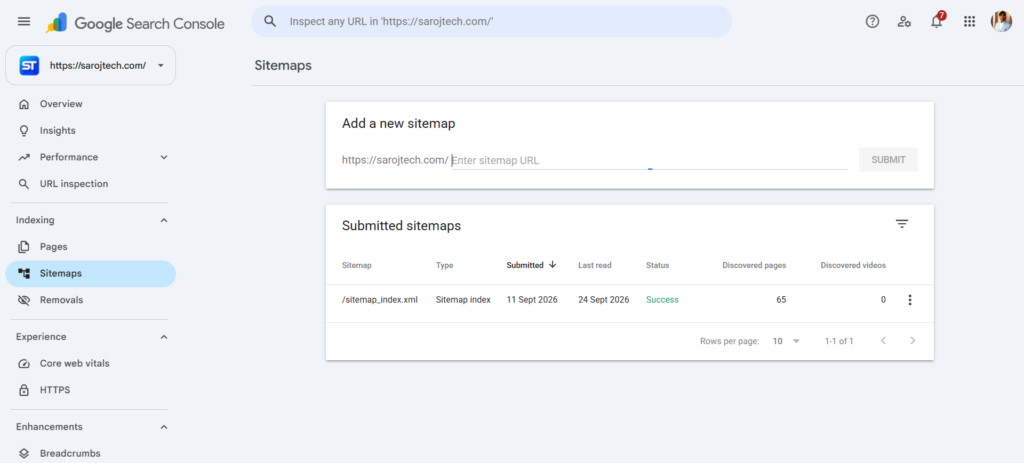
Once your XML sitemap is ready, you can submit it through Google Search Console.
- Open Google Search Console.
- Select your website property.
- Go to Sitemaps.
- Enter your sitemap path, such as
sitemap.xml. - Click Submit.
- Check the status for errors.
Google’s Sitemaps report also lets you see whether Google successfully accessed and processed the sitemap.
Add the Sitemap to robots.txt
You can also reference your XML sitemap in your robots.txt file:
User-agent: *
Disallow:

Sitemap: https://example.com/sitemap.xml
Google can discover the sitemap when it crawls your robots.txt file.
What Is the Use of a Sitemap?
A sitemap can help search engines:
- Discover new pages
- Discover updated URLs
- Find pages on large websites
- Understand the URLs you consider important
- Discover content on websites with complex navigation
- Process large numbers of URLs more efficiently
Sitemaps can be especially useful for new websites, large websites, websites with frequently changing content, and sites with pages that are not easily discovered through internal links.
However, don’t treat a sitemap as a shortcut to rankings. A sitemap helps with URL discovery and crawling, but it does not guarantee indexing or higher rankings.
Sitemap Best Practices
Keep these points in mind:
- Include only URLs you want search engines to index.
- Use canonical URLs.
- Use absolute URLs.
- Keep the sitemap accessible to search engine crawlers.
- Keep
lastmodaccurate when you use it. - Remove deleted or permanently redirected URLs.
- Update the sitemap when your website structure or content changes.
- Check Google Search Console periodically for sitemap errors.
- Use a sitemap index if your website has a very large number of URLs.
Google specifically notes that inaccurate lastmod information should be avoided and that priority and changefreq are ignored by Google.
XML vs HTML Sitemap
| Feature | XML Sitemap | HTML Sitemap |
|---|---|---|
| Main purpose | Search engines | Website visitors |
| Format | XML file | HTML webpage |
| Helps URL discovery | Yes | Yes, through links |
| Visible to visitors | Usually no | Yes |
| SEO role | Crawling and discovery | Internal linking and navigation |
| Typical location | /sitemap.xml | /sitemap/ |
Final Thoughts
An XML sitemap should be part of the basic technical SEO setup of most growing websites. An HTML sitemap isn’t mandatory for every site, but it can be useful when a website has many sections or pages.
The important thing is not simply creating a sitemap. Keep it clean, accessible, updated, and focused on the URLs that actually matter.



Leave a Reply